DAK by Arzisoftبالعربية

A Home AI box that lives in your office.

DAK, short for Dākhilī (داخلي, “local”), is a Home AI box: a machine in your office running open-weight AI models. It does the everyday work people pay the big frontier AI models for, without their monthly bills and without handing them your data. It reads your files, scans and recordings, and nothing it sees leaves the building. We build it, set it up, tune it to your work and keep it current.

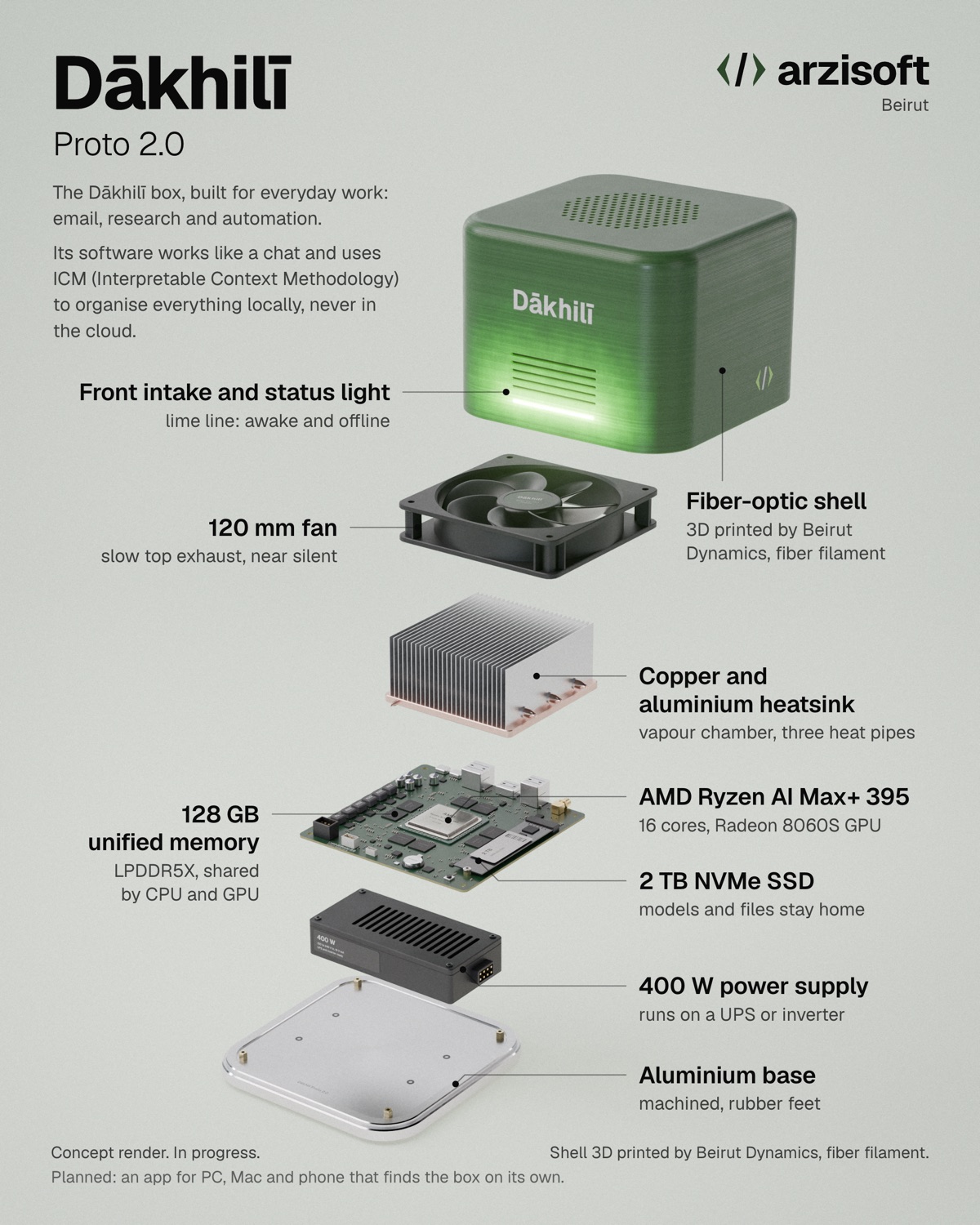
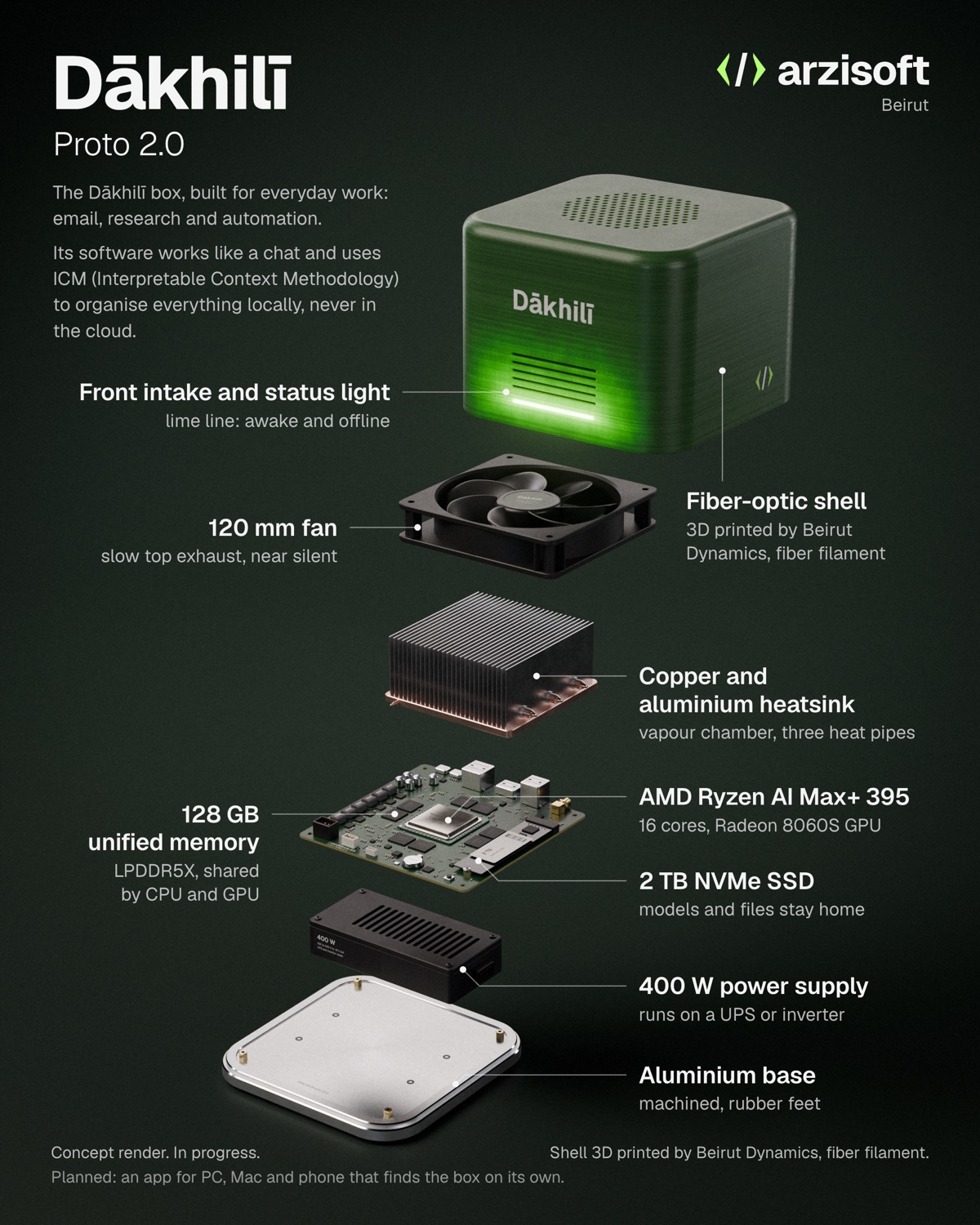
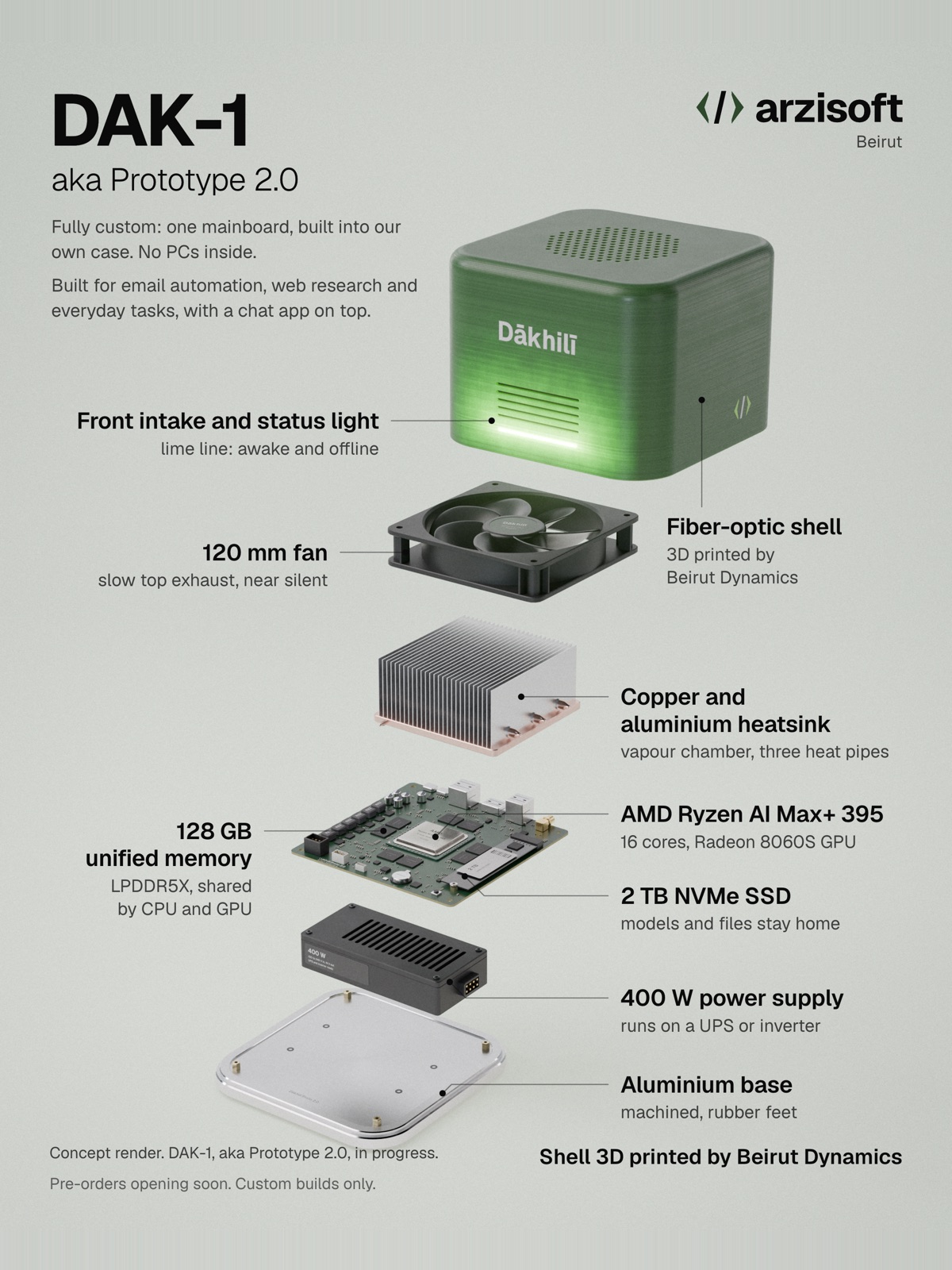
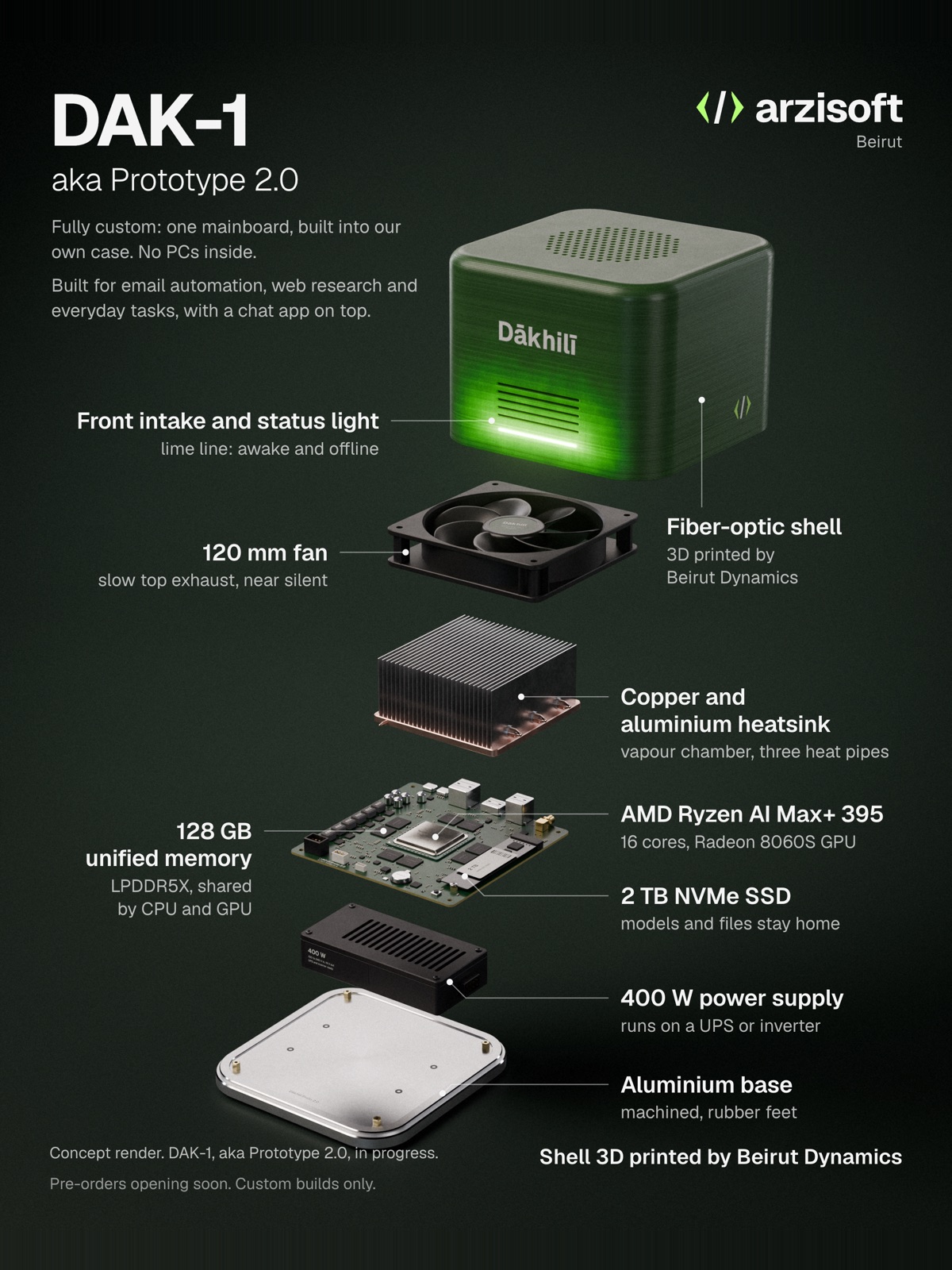
Concept render of DAK-1: a compact box with a 3D-printed shell on an aluminium base

Concept render. DAK-1, aka Prototype 2.0, in progress.

Our first product

DAK-1

aka Prototype 2.0

Fully custom: one mainboard built into our own case, no PCs inside. The base model, built for everyday office work.

Hardware

Processor
AMD Ryzen AI Max+ 395, 16 cores, Radeon 8060S graphics
Memory
128 GB unified LPDDR5X, shared by CPU and GPU
Storage
2 TB NVMe SSD, room for a second drive
Connections
Ethernet, Wi-Fi and USB-C
Case
Shell 3D printed by Beirut Dynamics in fiber filament, aluminium base

Built for

Email
Sorts, summarises and drafts replies. Nothing is sent without your OK.
Web research
Searches and browses for you, then summarises with sources.
Your files
Questions across your documents, scans and PDFs.
Meetings
Recordings turned into minutes and action points.
Routines
Scheduled tasks, reminders and follow-ups.

Power, estimated

Idle
About 10 W
Full load
About 140 W
Typical day
About 0.8 kWh (20 h idle, 4 h busy)
Month
About 24 kWh, and it runs on a UPS or inverter

Software

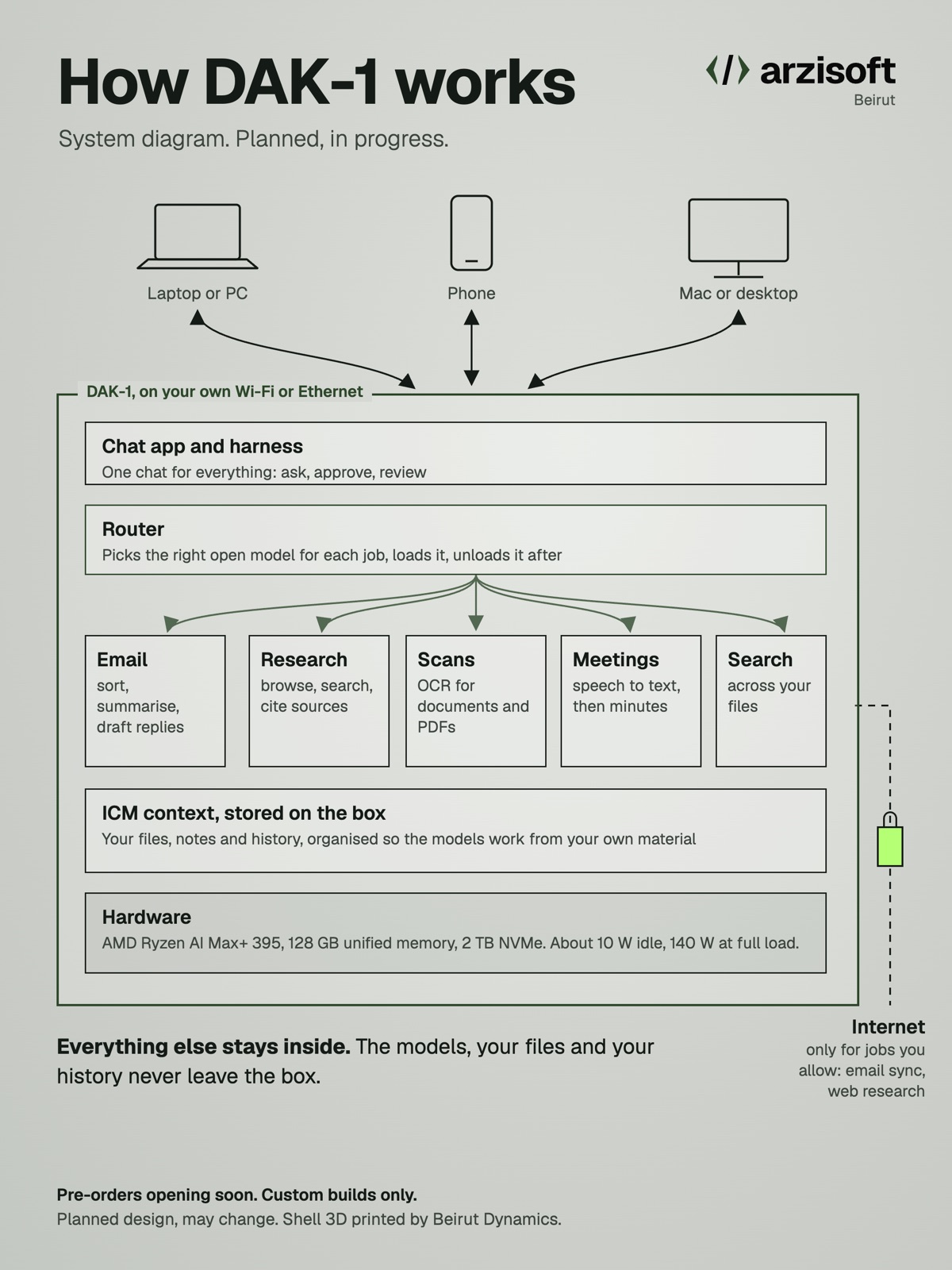
Open-weight models on the box, the right one picked for each job. A chat app for PC, Mac and phone that finds the box on your network. It goes online only for the jobs you allow, like email and web research.

Planned specs, may change. Power figures are estimates until we measure a finished unit. Images are concept renders. See how it fits together.

Pre-orders opening soon. Custom builds only.

Want to try it first? A few people can test-drive our working prototypes before launch, in person in Beirut or remotely.

How we got here

Three prototypes, one box.

Each one is a concept render of a machine we built or are building.

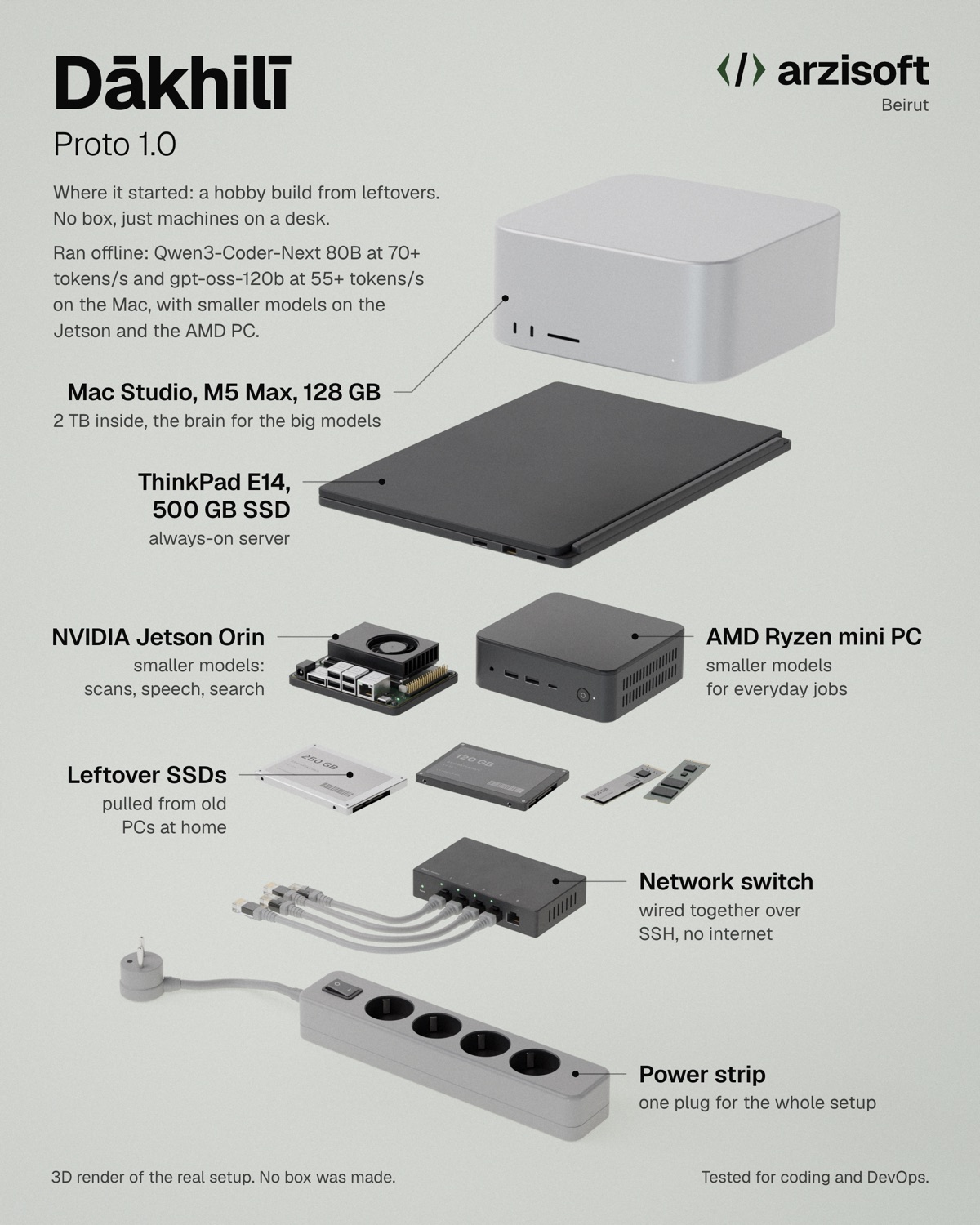
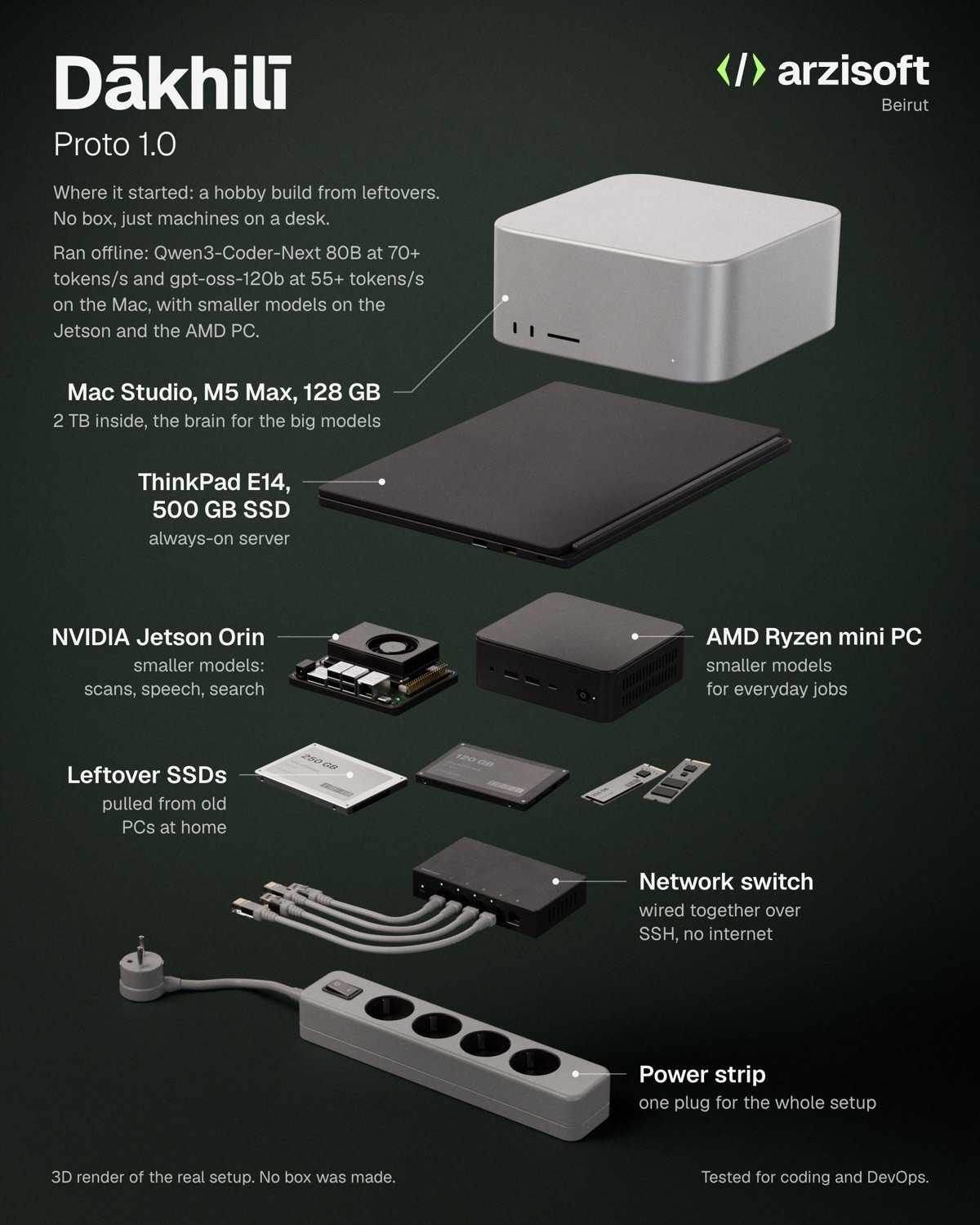
Concept render of Proto 1.0Proto 1.0

Built from leftovers.

A hobby build with no box: a friend's Mac Studio (M5 Max, 128 GB), a ThinkPad, a Jetson Orin, an AMD mini PC and spare SSDs, wired together over SSH on a balcony. It ran 80B and 120B open models for coding and DevOps, and proved this works at home.

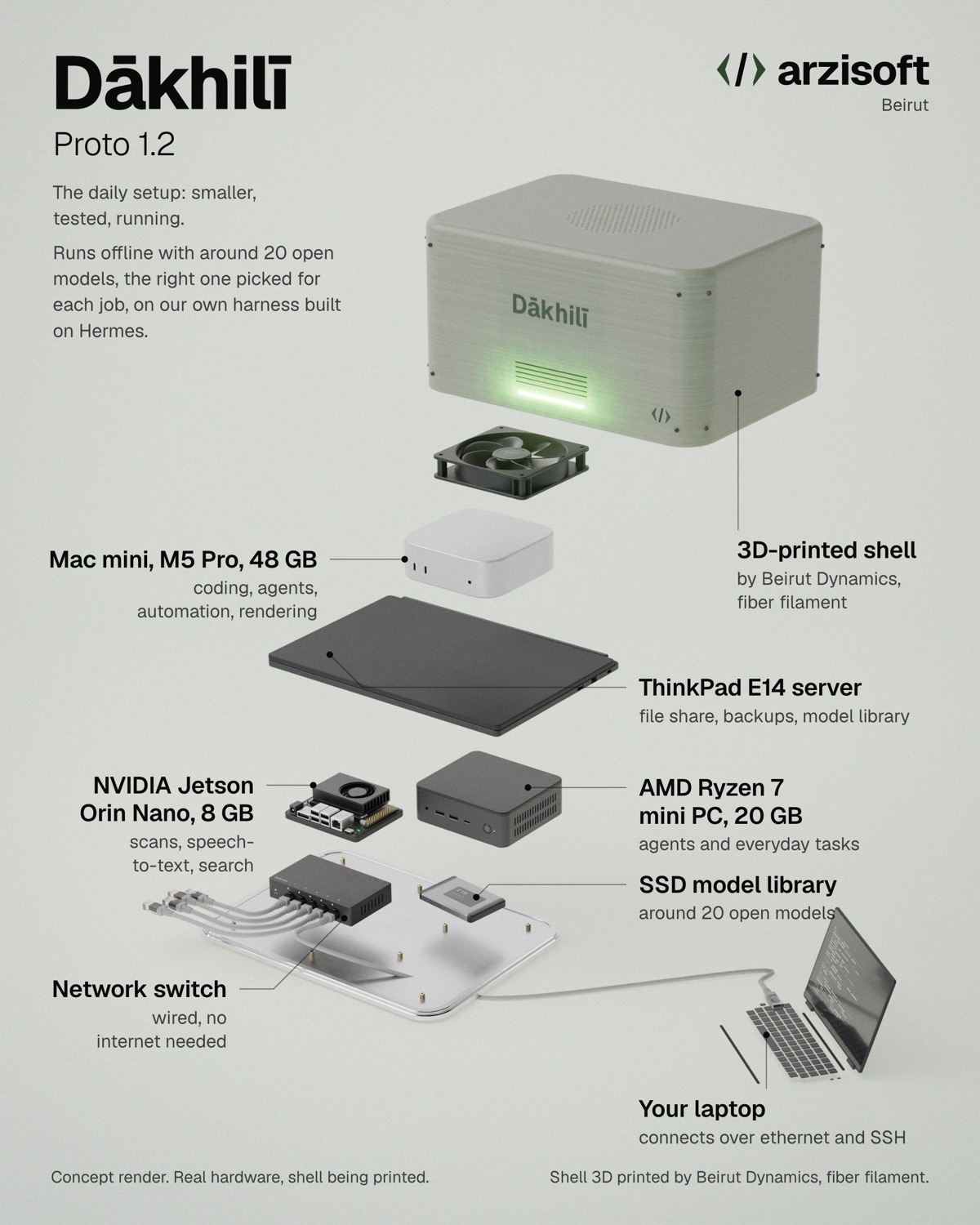
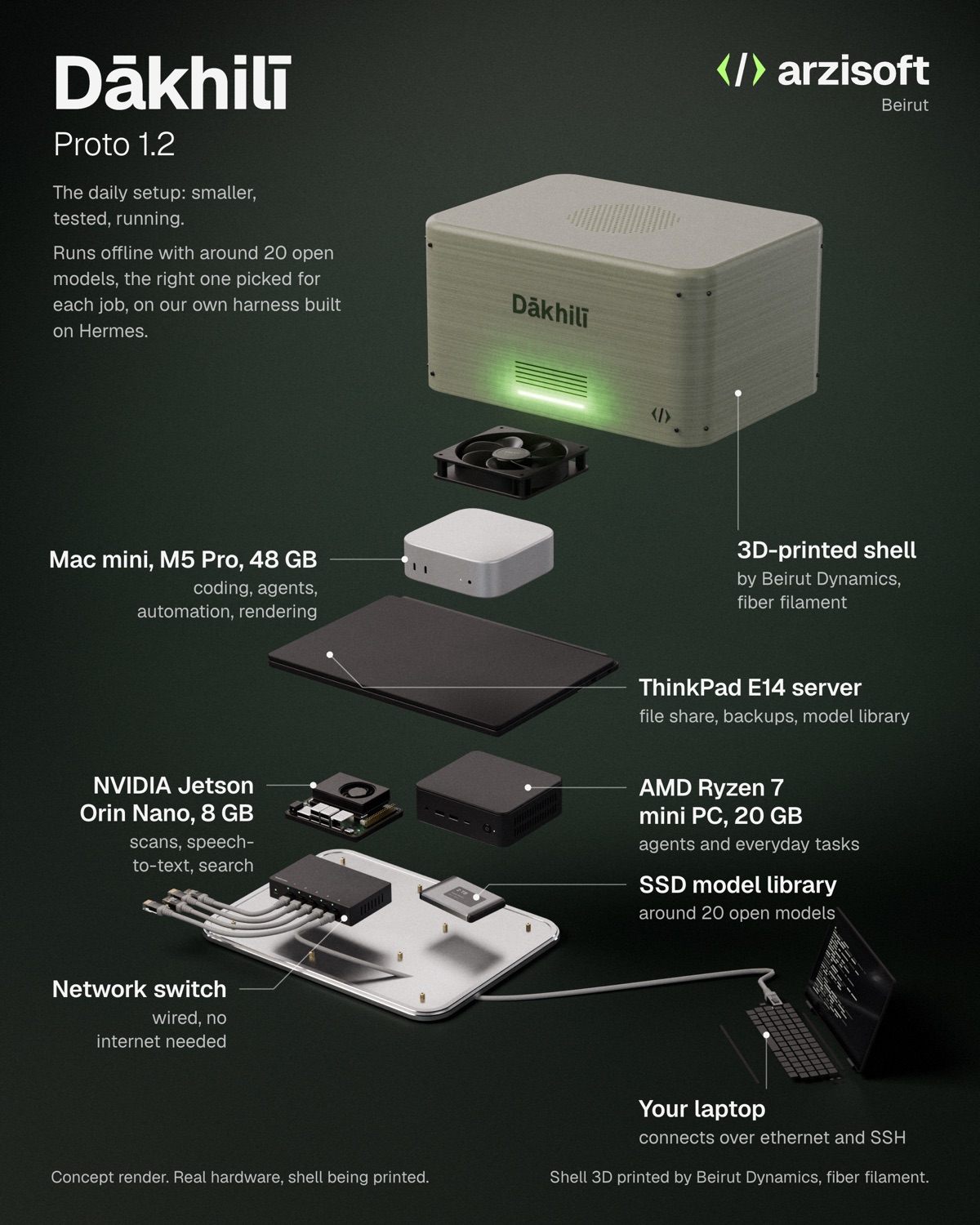
Concept render of Proto 1.2Proto 1.2

Our daily setup.

A Mac mini M5 Pro (48 GB), a Jetson Orin Nano, an AMD Ryzen 7 mini PC and a ThinkPad server, with around 20 open models and the first version of our own harness, built on Hermes. We use it every day. Its shell is being printed.

Concept render of Prototype 2.0Prototype 2.0

DAK-1.

Everything in one case: one mainboard, no PCs inside. Our first product, in progress.

Read how it started
Your data

Some files shouldn't go to a chatbot abroad.

Most offices have both kinds, mixed in the same folders.

01

Data you can't share

Professional secrecy, patient confidentiality, banking rules. Some files are not yours to send to a company in another country.

  • Client files and contracts
  • Patient records and lab results
  • KYC and compliance files
  • Audit working papers
02

Data you'd rather not share

Nothing forbids it. You'd still prefer it stayed in the office.

  • Pricing and tenders
  • Salaries and HR notes
  • Board minutes and strategy
  • Your own drafts and email
Why local

Private, offline, and yours.

Private

It stays in the room.

Questions, files and answers live on a machine in your office. They don't go to an AI company, and they don't go through us.

Offline

Works when the internet doesn't.

The models run on the box itself, so a dead connection doesn't stop work. It draws little power and runs happily on a UPS or inverter.

Owned

Nobody can switch it off.

No one can raise the price, cap your usage or swap the model behind your back. It changes when you decide it changes.

Predictable

Pay once. Then a care plan.

You buy the machine. There are no per-seat dollar subscriptions to keep alive on a foreign card. For an office of about 20 or more, that usually comes out cheaper within three years. Below that, the case is privacy and working offline, not price.

What it does

The AI your staff already use, kept at home.

Open-weight models only. Nothing to learn on your side.

01

Chat assistant

Draft, rewrite, translate and summarise, as with frontier AI models, minus the bill.

02

Ask your files

Questions answered from your own contracts, records and policies, with the source.

03

Read scans

Scanned letters, invoices and PDFs turned into text and tables you can search.

04

Transcribe

Meetings and voice notes to text, then to minutes and action items.

05

Routine agents

Morning briefs, first-draft replies, form filling, report assembly.

06

Arabic, French, English

Works in the three languages Lebanese offices actually mix.

07

Images

Generate and edit images for decks and social posts, on the same box.

08

Coding help

A private code assistant for your developers, if you have them.

Four ways in

New machine, your machine, or your own model.

Every setup is built to order. Prices on request.

We build the box

01

For offices starting from zero.

  • We choose the hardware for your headcount and jobs
  • Assembled, installed and tested before delivery
  • Delivered, plugged in and set up on site

We install on yours

02

For offices with a capable PC or server already.

  • We check what your hardware can run, honestly
  • Full setup: models, interface, users, backups
  • No new machine if the one you have is enough

Office server

03

For teams who want one machine everyone shares.

  • One dedicated machine in your server room
  • Staff reach it from their desks over the office network
  • Private VPN for people working from home, if you want it

Custom models

04

For work that needs your own vocabulary.

  • Search built over your documents, kept current
  • Open models fine-tuned on your own examples
  • Trained and run on your machines, never ours
Plus · Care plan

Updates you approve, better models as they come out, backups and help when something breaks. Yearly, and optional: stop it and the box keeps working.

Sizes

Three sizes, sized in writing.

Built to order. We size for your headcount and the next two years.

Small

One person or a small office

Mac mini class, or a low-power edge box

  • Chat and drafting
  • Reading scans
  • Transcription

Team

An office of up to about 20 people

High-memory mini PC or a GPU workstation

  • Several people at once
  • Search across the firm's files
  • Routine agents

Heavy

Bigger models and fine-tuning

Mac Studio class or a multi-GPU workstation

  • Larger, stronger models
  • Training on your data
  • Long documents
Care plan

Kept current, on your terms.

  • Updates you approve before they install, with one-step rollback
  • Better open models when they come out, tested on your box first
  • Health checks so we see a failing disk before you do
  • Encrypted backups to a drive you keep
  • Security patches for the system underneath
  • Remote help only through a session you open, or a visit in Lebanon
Security

Locked down by default.

  • Full-disk encryption, so a stolen box is a brick
  • Remote access off by default
  • No usage data sent to us or anyone else
  • Your accounts and passwords. We hand over every key
  • Updates signed and approved by you, never pushed silently
How it works

From audit to your desk.

Audit → Build → Tune → Hand over → Maintain. Usually three to four weeks, start to finish.
01
Audit

See what you have.

A visit or a call. What data you handle, how many people, which jobs you want done and what hardware is already there.

Week 1
02
Build

Spec it, build it, test it.

We pick the machine, assemble it and install the models and interface. Every job you named gets tested on it before it leaves us.

Weeks 1 to 3
03
Tune

Make it yours.

We load your documents, set up users and permissions, and fine-tune a model on your examples if the work calls for it.

Week 3 to 4
04
Hand over

On site, with your staff.

We install it in your office and train the people who'll use it. You get the passwords, the documentation and a phone number.

One day
05
Maintain

Keep it current.

The care plan covers updates, new models, backups and help when something breaks. You stay in charge of what changes.

Yearly
Honest limits

What it won't do, up front.

Local models are smaller than the biggest cloud models. For drafting, summarising, searching your files, reading scans and transcribing, they do the job well.

Some tasks still belong in the cloud, such as frontier-level research or very long reasoning chains. We tell you which ones before you buy.

A box has a fixed amount of memory. We size it for what you need now and the next two years, and say so in writing.

Our own lab

We run the same setup every day.

Arzisoft runs its own work on local machines in Beirut. The stack we install for you is the stack we use: open models on llama.cpp, an agent harness for multi-step jobs, and a model library on our own storage.

Mac mini, 48 GBWriting, vision and agents on 27B to 35B open models
AMD Ryzen PCA second worker for agents and text when the Mac is busy
NVIDIA Jetson OrinReading scans, speech to text and document search, at a few watts
SSD model libraryEvery model we've tested, archived and checksummed
FAQ

Questions offices ask us first.

Is it as good as the frontier AI models?

For most office work, close enough that staff stop noticing: drafting, summarising, translating, answering from your files. The frontier models are still ahead on the hardest reasoning tasks, but they're expensive, billed per seat or per use, and everything you send them goes to their servers. We show you both side by side during the audit so you can judge for yourself.

Does it work in Arabic?

Yes. The open models we install read and write Arabic, French and English, and handle the mix of the three that most Lebanese offices use. We test your own Arabic documents during the audit.

What happens when the internet goes down?

Nothing changes. The models run on the box in your office, so it keeps working with no connection at all. On a UPS or inverter it also rides through power cuts.

How long until it's running?

Usually three to four weeks from the audit to handover, depending on hardware availability and how much tuning the work needs. Installing on hardware you already own is faster.

Who keeps it up to date?

With a care plan, we do. We test each update and each new model on a machine like yours first, and you approve it before it installs. If something goes wrong, it rolls back in one step.

Can it read scanned documents?

Yes. It turns scans and PDFs into searchable text, tables included, so they can be asked about like any other file.

Can it learn our way of writing?

Yes. We can fine-tune an open model on examples of your own documents, on your own machine, so drafts come out in your format and vocabulary. The training data never leaves your office.

What if we stop the care plan?

The box keeps working exactly as it is, offline, indefinitely. You own it, and you have every password. You just stop getting updates and new models from us.
Tell us about your office.

Headcount, the kind of files you handle and what you'd like it to do. We reply within a business day with a first recommendation.

Request a quote →